Tile Match Challenge
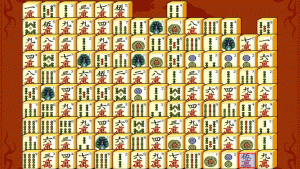
Tile Matching Observation Timed Puzzles Family Game
Tile Match Challenge
117
Developer: White Core Interactive
Updated: 2026-07-21

Reviews

Tile Match Challenge offers a refined take on the classic matching formula. The core mechanic of connecting identical tiles with a two-turn line is simple yet surprisingly deep. Each of the twelve boards presents a unique layout, gradually increasing in complexity. The timer adds a welcome sense of urgency without becoming punishing. Visual feedback is crisp, and the controls are responsive across devices. This is a solid choice for players seeking a short, engaging mental workout that respects their time.

Description

Core Matching Mechanics

Players select two identical tiles that can be linked by a line with at most two turns. The connecting path must not pass through any other tiles, adding a spatial reasoning element to each move. This simple rule set creates a puzzle experience that is easy to learn but requires focused attention.

Level Progression and Variety

The game includes twelve distinct board layouts, each offering a fresh arrangement of tiles. Early levels introduce basic patterns, while later stages present more complex configurations that demand sharper observation. The timer adds a gentle pressure, encouraging efficient decision-making without overwhelming the player.

Visual and Interactive Design

Colorful tile designs and smooth animations make each match feel satisfying. The interface is clean and uncluttered, allowing players to focus on the puzzle. Visual feedback confirms successful connections, and the overall aesthetic supports a calm yet engaging atmosphere.

Accessibility and Platform Support

Optimized for both desktop and mobile browsers, the game adapts to different screen sizes. Controls are intuitive, relying on simple clicks or taps. This cross-platform compatibility ensures a consistent experience whether playing on a computer, tablet, or smartphone.

Skill Development and Replay Value

Regular play can improve visual scanning speed and pattern recognition. The timed nature encourages players to think ahead and plan sequences of matches. With no two playthroughs feeling exactly the same, the game offers lasting appeal for short sessions or longer practice.


✅ Compatibility & Testing

• Desktop (Windows 11, macOS Ventura)
• Mobile (iPhone 14, Samsung Galaxy S23)
• Tablet (iPad Pro, Android tablet)
✅Supported browsers: Chrome, Safari, Edge, Firefox (latest versions)
❌ Not supported: Internet Explorer, older browser versions

Faq

Is Tile Match Challenge suitable for children?
Yes, the game is designed for all ages. It contains no violent or inappropriate content. The simple rules and colorful visuals make it accessible to younger players, while the timed puzzles provide enough challenge to engage older audiences.
Can I play Tile Match Challenge without an internet connection?
The game is typically played in a web browser, so an internet connection is required to load it. Once loaded, some versions may allow offline play, but this depends on the specific implementation. Check the game's settings or documentation for offline capabilities.
What happens if I cannot find any matching tiles?
If no valid pairs are available, the board may be reshuffled to provide new matching opportunities. This feature helps prevent the game from becoming stuck and keeps the puzzle solvable. The reshuffle option is usually automatic or triggered by the player.
How is the score calculated in Tile Match Challenge?
Scores are typically based on the time taken to clear each board and the number of moves used. Faster completions and fewer moves generally yield higher scores. Some versions may also award bonus points for consecutive matches without mistakes.
Does Tile Match Challenge have any power-ups or hints?
Some versions of tile-matching games include hints or power-ups that reveal possible matches or shuffle the board. The presence of these features depends on the specific game implementation. Check the game interface for any available assistance options.
Can I pause the timer during a level?
Many browser-based puzzle games allow pausing, but this feature is not guaranteed. If the game includes a pause button, it will typically stop the timer and freeze the board, letting players resume later. Look for a pause icon in the game menu.

Comments

0 comments
U
User
Loading comments...