Insect Spelling Learning Game
Reviews
Insect Spelling Learning Game offers a simple yet effective way to build vocabulary and spelling skills. The clear insect images and straightforward letter selection make it accessible for young learners and adults alike. It runs smoothly on both mobile and desktop browsers without any downloads. The family-friendly design and free access make it a great tool for casual learning at home or in the classroom.
Description
Game Introduction
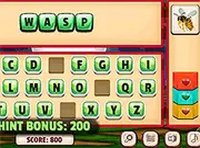
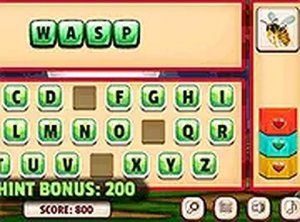
Insect Spelling Learning Game is a thoughtfully designed educational activity that combines visual recognition with word construction. Players are presented with a clear picture of an insect and are invited to spell the insect's name by choosing letters from an on-screen alphabet. The core objective is to complete the spelling correctly while managing a limited number of attempts. Each correct letter selection adds to the word being formed, while each incorrect choice reduces the available attempts. The activity continues until the word is fully spelled or all attempts are used. This format makes the game accessible to both children and adults who want to learn insect names and strengthen their spelling abilities. The game runs directly in a web browser without any downloads or installations, and it works smoothly on both mobile phones and desktop computers.
How to Play
Players begin by looking at the insect image shown on the screen. Below the image, an alphabet display allows players to select letters one at a time. Choosing a correct letter adds it to the spelling area, while an incorrect choice reduces the number of remaining attempts. The game typically starts with a set number of attempts, and the round ends when the word is spelled correctly or when all attempts are exhausted. The interface is designed to be simple and intuitive, making it easy for players of any age to start playing without instructions.
Game Features
This educational game offers family-friendly content that is suitable for all age groups. It is free to play with no downloads or installations required. The game supports both mobile and desktop devices, allowing players to learn anywhere. A full screen mode option is available for a more focused experience. The interface is clean and straightforward, featuring clear insect images and an easy-to-use alphabet selection. Playing the game helps improve vocabulary, spelling accuracy, and knowledge of insects.
Tips for Success
Take a moment to carefully look at the insect image before starting to spell. Begin with shorter insect names to build confidence. Practice regularly to improve both speed and accuracy. Using full screen mode can help reduce distractions. If unsure about a letter, try sounding out the word quietly. Remember that each incorrect guess reduces your remaining attempts, so think before selecting a letter.