8 Ball Billiards Classic Pool Game
Review
8 Ball Billiards Classic Pool Game offers a polished and realistic pool experience directly in your browser. The intuitive mouse controls make aiming and power adjustment easy, while the smooth graphics and physics capture the feel of a real table. The option to play against AI or a friend adds replay value. Stat tracking helps you monitor progress, and adjustable difficulty keeps the challenge fresh. It is a solid choice for casual players and billiards enthusiasts alike.
Full story
Game Introduction
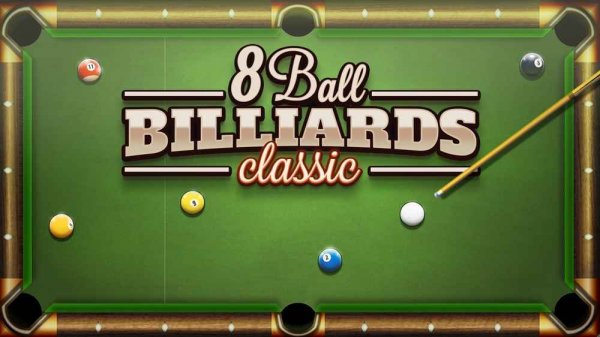
8 Ball Billiards Classic Pool Game is a free online sports game that recreates the experience of playing 8-ball pool. The core objective is to pocket all of your assigned balls—either solids or stripes—and then sink the 8-ball to win the match. The game assigns your ball type based on the first ball you pot, so every shot carries weight. With intuitive mouse controls, players can aim the cue stick and adjust shot power by clicking and dragging. The smooth graphics and realistic physics capture the essence of 8-ball pool, making it a suitable choice for both newcomers and those with more experience. Whether you have a few minutes or want a longer session, this game offers quick and engaging matches.
How to Play
Players use the mouse to aim the cue stick at the cue ball. By clicking and dragging the cue stick backward, you set the power of your shot, then release to strike the ball. The first ball you pocket determines whether you play solids or stripes. Your objective is to clear all your assigned balls from the table before your opponent does. Once all your balls are potted, you can aim for the 8-ball. Sinking the 8-ball early results in an automatic loss, so careful planning is required. Players can adjust the AI difficulty in settings or remove the trajectory guide for a greater challenge.
Game Features
Easy and intuitive controls allow for quick learning. Play against a computer opponent or a friend in two-player mode. The game includes stat tracking to monitor your performance. Smooth graphics and animations contribute to a realistic pool experience. The game offers a good way to practice aiming and strategy skills. The two-player mode adds friendly competition.
Tips for Success
Practice your aim and shot power regularly to improve consistency. Learn to plan several shots ahead, considering where the cue ball will end up after each stroke. Use the trajectory guide if available to better understand angles. Adjust the AI difficulty gradually as you improve. In two-player mode, observe your opponent's weaknesses and adapt your strategy accordingly.