Pixel Paint Clash
Reviews
Pixel Paint Clash succeeds by focusing on creative cooperation rather than direct confrontation. The varied map designs keep each match fresh, forcing teams to adapt their painting strategies. The pixel art style is charming and functional, making it easy to track the action. With quick match times and a low barrier to entry, this game is a great choice for casual players looking for a fun, family-friendly challenge.
Description
Team-Based Arena Control
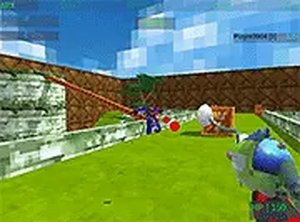
Pixel Paint Clash centers on cooperative play where two teams compete to dominate a shared space. The primary goal involves using paint tools to spread your team's color across the arena's surfaces. Success depends on coordinating movements with teammates to claim key areas while preventing the opposing side from doing the same. This creates a dynamic push-and-pull that rewards communication and quick thinking.
Map Layouts and Strategic Depth
Each match takes place on a uniquely designed blocky map. These arenas feature varied elevations, narrow passages, and open zones that influence how teams approach the objective. Some maps may favor aggressive spreading, while others require careful defense of already painted sections. Learning the terrain becomes essential for planning effective routes and ambush points.
Paint Tools and Customization
Players have access to different paint tools, each with distinct characteristics. Some tools may cover large areas quickly but with less precision, while others offer accurate shots for marking specific opponents or surfaces. This variety allows players to adapt their strategy based on their role in the team or the map's layout. Experimenting with different tools helps find a personal playstyle.
Visual Style and Atmosphere
The game uses pixelated graphics that give a nostalgic feel while keeping the action clear and readable. Bright colors dominate the screen as paint splatters across the blocky environment. The visual feedback from painting surfaces provides immediate satisfaction, and the clean art style ensures that even chaotic matches remain easy to follow.
Match Flow and Session Length
Matches are designed to be quick and energetic, typically lasting a few minutes. This makes Pixel Paint Clash ideal for short gaming sessions or quick breaks between other activities. The fast pace keeps players engaged, and the simple objective of covering more area than the opponent ensures that each round feels distinct.

Comments
0 comments