Jump & Dash Arcade Runner
Reviews
Jump & Dash Arcade Runner delivers a tight, satisfying arcade experience that respects your time. The level design gradually builds complexity without becoming frustrating, and the lack of a lives system encourages experimentation. Controls feel snappy on both keyboard and touch, and the cheerful art style keeps the mood light. It is an ideal pick for short bursts of play or longer sessions focused on improving your score. The game succeeds in being both accessible and engaging.
Description
Core Movement Mechanics
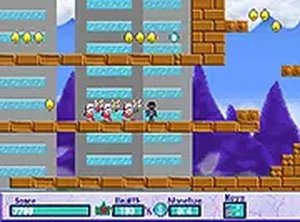
At its heart, this arcade obstacle course relies on precise timing and quick reactions. Players guide a character through a series of environmental challenges using either keyboard keys or touch gestures. The primary actions involve leaping over gaps, ducking beneath overhead obstacles, and dashing across moving platforms. Each level introduces new arrangements that test your ability to read the course ahead and react without hesitation.
Level Design Philosophy
The courses are built around short, focused segments that can be completed in a few minutes. This design suits both quick breaks and longer play sessions. Early stages teach basic maneuvers, while later levels combine multiple obstacle types, requiring players to chain together jumps and dashes. The visual style remains bright and clear, making it easy to spot upcoming hazards and plan your path.
Scoring and Progression
Scattered throughout each course are collectible orbs that add to your overall score. Reaching the end of a level grants a base score, but gathering all orbs along the way offers a significant bonus. This encourages replaying levels to find optimal routes. The game does not include a lives system, so players can retry any course as many times as they wish, focusing on improvement rather than punishment.
Control Options and Accessibility
Desktop players can use arrow keys or WASD for movement and the spacebar to jump. On mobile devices, simple taps and swipes replace keyboard inputs. The interface includes a full-screen toggle for a more immersive view. Controls are responsive and designed to feel natural on both platforms, with minimal input lag. This flexibility ensures that players can choose their preferred method without sacrificing performance.
Visual Style and Atmosphere
The game presents a clean, colorful world with distinct backdrops for each stage. Characters and obstacles are rendered in a friendly cartoon style, avoiding any threatening imagery. The color palette shifts between levels to provide visual variety without becoming distracting. Background music and sound effects are upbeat and non-intrusive, complementing the action without overwhelming the player.
Tips for Improving Your Run
Focus on learning the rhythm of each obstacle sequence rather than rushing through. Watch the patterns of moving platforms before committing to a jump. Use the full-screen mode to reduce visual clutter and improve your peripheral awareness. If you struggle with a particular section, try observing the course from a safe spot before attempting a fast run. Patience and practice will naturally lead to better times and higher scores.







Comments
0 comments