Heavy Vehicle Backing Challenge
Reviews
This browser-based simulation offers a focused and rewarding experience for anyone interested in precision vehicle control. The realistic trailer physics create genuine challenges, especially when backing into tight spaces. Multiple camera angles give players the tools needed to plan their approach. The lack of time pressure reduces frustration and allows for thoughtful practice. It is an excellent choice for short sessions or longer periods of concentration.
Description
Core Objective & Control Scheme
The primary challenge in this simulation revolves around positioning a large vehicle and its trailer within a clearly marked parking space. Players rely on keyboard or mouse inputs to steer the truck forward and backward. An on-screen directional indicator points toward the target area, simplifying navigation. The absence of a timer allows for thoughtful decision-making, making each attempt a test of patience and precision rather than speed.
Visual Feedback & Camera Options
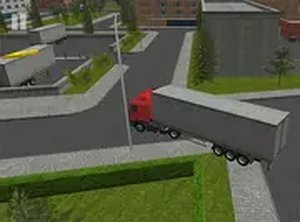
The game presents a realistic three-dimensional environment with detailed vehicle models and surroundings. Multiple camera angles are available, giving players the ability to switch between overhead, rear, and side views. This flexibility is crucial for judging the trailer's position relative to obstacles and the parking boundaries. Visual cues confirm when the vehicle is correctly aligned, providing clear feedback for successful parking.
Trailer Physics & Maneuvering Techniques
One of the defining aspects of this experience is the realistic physics governing the trailer's movement. Unlike a standard vehicle, the trailer responds differently to turns, requiring players to anticipate its path. Backing up introduces additional complexity, as the trailer can swing unexpectedly. Making small, gradual steering adjustments is often more effective than sharp turns, helping to maintain control and avoid misalignment.
Accessibility & Session Flexibility
Designed for desktop browsers, this simulation requires no installation or registration. Players can start a session instantly and pause or restart at any time without penalty. This structure suits both short breaks and extended practice periods. The straightforward controls and clear objectives make it approachable for newcomers while still offering depth for those seeking a satisfying spatial puzzle.
Practice Environment & Skill Development
Regular engagement with the game helps improve spatial reasoning and steering accuracy. The different parking scenarios, which may vary in layout and difficulty, provide a gradual learning curve. By experimenting with camera angles and movement patterns, players develop a better understanding of how the trailer reacts in various situations. Patience and careful observation are rewarded with consistent progress.







Comments
0 comments